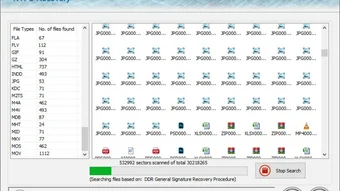
Screenshots

App-Details
- Version
- 3.0.4.5
- Größe
- 2.08 MB
- Aktualisiert
- July 12, 2024
- Erfordert
- Windows 11
- Sprache
- English
- Lizenz
- Full
- Entwickler
- Disk Restore
- Kategorie
- Windows OS
SoftPas auf:
Dieses Produkt ist auch in den folgenden Sprachen verfügbar:
Über NTFS Partition Disk Restore
Download NTFS Partition Disk Restore – Sicheres Windows-Datenwiederherstellungs-Tool
Overview
NTFS Partition Disk Restore ist eine professionelle Daten‑Wiederherstellungs‑Anwendung, die speziell für Windows‑Umgebungen entwickelt wurde. Entwickelt vom erfahrenen Team von Disk Restore, liefert die Vollversion-Software eine erschwingliche, aber leistungsstarke Lösung zum Retten verlorener Dateien von NTFS‑formatierten Festplatten, die partitioniert, beschädigt oder anderweitig unzugänglich geworden sind. Egal, ob Sie ein Heimanwender sind, der versehentlich ein wichtiges Fotoalbum gelöscht hat, ein Büroadministrator, der mit einem plötzlichen Systemabsturz konfrontiert ist, oder ein IT‑Fachmann, dem die Wiederherstellung geschäftskritischer Daten anvertraut ist – NTFS Partition Disk Restore bietet eine benutzerfreundliche Oberfläche kombiniert mit tiefgreifenden Scan‑Algorithmen, die Dateien, Ordner, Medien‑Assets und Systemdateien lokalisieren und wiederherstellen. Das Programm bewältigt ein breites Spektrum an Datenverlust‑Szenarien – einschließlich menschlicher Fehler, Hardware‑Fehlfunktionen, Software‑Fehler, beschädigter Boot‑Sektoren und nicht lesbarer Festplatten – indem es eine virtuelle Karte der verlorenen Partition erstellt und die wiederherstellbaren Informationen sicher an einen von Ihnen gewählten Ort extrahiert. Seine hoch konfigurierbare Engine läuft effizient auf Standard‑PC‑Hardware und stellt sicher, dass Wiederherstellungsaufgaben schnell abgeschlossen werden, ohne die Systemressourcen zu überlasten. Kurz gesagt, NTFS Partition Disk Restore überbrückt die Lücke zwischen komplexer Daten‑Wiederherstellungstechnologie und alltäglicher Benutzerfreundlichkeit und ist damit eine unverzichtbare Ergänzung für jedes Windows‑Werkzeugset.
Key Features of NTFS Partition Disk Restore
- Deep Scan Engine – Detects lost partitions and files even after severe corruption.
- Selective Recovery – Choose specific files, folders, or entire volumes to restore.
- Preview Before Recovery – View thumbnails and file details before committing to restore.
- Supports Large Drives – Handles disks up to 16 TB and partitions larger than 2 TB.
- Batch Mode – Automate multiple recovery jobs with a single click.
- Secure Data Handling – Writes recovered data to a user‑defined safe location, avoiding overwriting the source drive.
- Unicode & Long‑File‑Name Support – Fully compatible with modern Windows naming conventions.
- Multi‑Language Interface – Available in English, Spanish, German, French, and more.
- Regular Updates – Free patches that keep the recovery algorithms current with the latest NTFS changes.
- Comprehensive Log Files – Detailed reports for each recovery session, useful for audits and troubleshooting.
Each of these features is designed to simplify the recovery workflow while maximizing the amount of data that can be salvaged. For example, the Deep Scan Engine uses a sector‑by‑sector analysis that goes beyond simple file‑system metadata, enabling the tool to reconstruct fragmented files that other utilities often miss. The Preview function eliminates guesswork; you can confirm the integrity of a photo or document before it occupies precious storage space on the destination drive. Together, these capabilities make NTFS Partition Disk Restore a standout option for both novice users and seasoned technicians who demand reliability and speed.
Installation, Usage & Compatibility
NTFS Partition Disk Restore runs on all modern Windows operating systems, including Windows 10, Windows 11, and Windows Server 2016‑2022 (both 32‑bit and 64‑bit builds). The installer is a lightweight EXE package that can be downloaded directly from the official Disk Restore website.
Step‑by‑Step Installation
- Download the installer: Click the “Download” button on the product page. The file size is under 30 MB, making it quick to fetch even on slower connections.
- Run as Administrator: Right‑click the downloaded
NTFS_Partition_Disk_Restore_Setup.exeand select “Run as administrator” to grant the installer the necessary system permissions. - Accept the license agreement: Review the End‑User License Agreement (EULA) and click “I Agree” to proceed.
- Choose installation folder: By default the program installs to
C:\Program Files\DiskRestore\NTFSPartition, but you can select an alternate path if desired. - Complete the setup: Click “Install” and wait for the progress bar to finish. A final dialog offers to launch the application immediately.
First‑Run Configuration
When you launch NTFS Partition Disk Restore for the first time, you will be greeted with a short wizard that helps you define the default recovery destination. It is advisable to select a separate physical drive or an external USB stick to prevent accidental overwriting of the damaged source disk. The wizard also lets you configure automatic update checks and set a preferred language.
Typical Recovery Workflow
- Select the damaged drive: From the main dashboard, choose the partition that shows “Lost” or “Corrupted”.
- Choose scan mode: Opt for “Quick Scan” if you suspect recent deletions, or “Deep Scan” for severe corruption.
- Review results: Once scanning completes, the software displays a hierarchical view of recoverable items. Use the preview pane to verify file integrity.
- Start recovery: Highlight the files/folders you need, click “Recover”, and confirm the destination path.
- Verify and log: After the process ends, open the generated log file to confirm successful restoration and to review any files that could not be recovered.
The entire process is designed to be intuitive; even users with limited technical background can follow the visual cues and tooltips that appear throughout the interface. For power users, a command‑line switch is available for batch automation, enabling integration with larger IT workflows.
Pros, Cons, FAQ and Final Verdict
Pros
- Deep scanning algorithm recovers files most free tools miss.
- User‑friendly UI with real‑time preview of recoverable data.
- Supports very large NTFS volumes and multiple language packs.
- Secure recovery path prevents accidental overwriting of source media.
- Regular free updates keep the engine compatible with the latest Windows releases.
Cons
- Only available for Windows; no native macOS or Linux version.
- Full version is paid; the free trial limits the amount of data you can recover.
- Deep scans on very large drives can take several hours.
- No built‑in cloud backup integration.
- Command‑line automation requires basic scripting knowledge.
Overall, the balance of powerful recovery capabilities against a modest price point makes NTFS Partition Disk Restore a compelling choice for anyone who regularly deals with NTFS partitions. The few drawbacks—primarily platform limitation and trial constraints—are outweighed by the reliability and depth of the scanning engine.
Frequently Asked Questions
Can NTFS Partition Disk Restore recover data from a physically damaged drive?
The software can retrieve data from drives that are logically damaged (corrupted file system, lost partition, etc.). If the drive has severe hardware failures—such as a broken spindle or read‑write head—it's advisable to first clone the disk using a hardware imaging tool before running the recovery.
Is there a free version or trial available?
Yes, Disk Restore offers a 30‑day free trial that allows you to scan and preview lost files. The trial limits the total amount of data you can recover, encouraging users to purchase the full license for unlimited restoration.
What file types can be recovered?
NTFS Partition Disk Restore supports a wide range of formats, including documents (DOCX, PDF, TXT), images (JPG, PNG, BMP), videos (MP4, AVI, MKV), audio files (MP3, WAV), archives (ZIP, RAR) and system files (DLL, EXE, SYS). The preview function works for most common media types.
How does the software ensure recovered data is not corrupted?
During recovery, the engine verifies each file's integrity by checking its header and, when possible, its checksum. Corrupted fragments are flagged in the log, allowing you to decide whether to keep or discard them.
Can I run the program on a Windows Server environment?
Absolutely. The application is fully compatible with Windows Server 2016, 2019 and 2022, making it suitable for enterprise data‑recovery scenarios.
Conclusion & Call to Action
NTFS Partition Disk Restore delivers a robust, Windows‑focused data‑recovery solution that balances professional‑grade scanning power with an approachable interface. Whether you need to rescue a single accidentally deleted photo or recover an entire corrupted partition after a system crash, the tool provides the features, speed, and security required for a successful outcome. Its compatibility with the latest Windows releases, support for massive drives, and detailed logging make it a reliable addition to any IT toolbox. If you’re ready to protect your valuable data and avoid costly downtime, download NTFS Partition Disk Restore now and start the free trial. Secure your files, restore confidence, and keep your Windows environment running smoothly.
Anleitungen & Tutorials
So installierst du NTFS Partition Disk Restore
- Klicke oben auf die Schaltfläche Herunterladen.
- Akzeptiere nach der Weiterleitung die Bedingungen und klicke auf Installieren.
- Warte, bis der Download von NTFS Partition Disk Restore auf deinem Gerät abgeschlossen ist.
So verwendest du NTFS Partition Disk Restore
Diese Software wird hauptsächlich für die oben beschriebenen Kernfunktionen verwendet. Öffne die App nach der Installation, um ihre Möglichkeiten zu erkunden.
Nutzerbewertungen
Noch keine Bewertungen. Teile als Erste/r deine Erfahrung.
Das könnte dir auch gefallen
mehr
Llama 2
Free-to-use large language model As the new addition to Meta’s arsenal of langua...

NotebookLM
Revolutionizing the note-taking and idea-generation process NotebookLM is an exp...

Github co pilot
AI-inspired software development and coding platform GitHub Copilot is a browser...

Google Gemma
Google’s lightweight AI models Introducing Google Gemma , a family of cutting-ed...

AI Image Enlarger
A free app for Windows, by ai-image-larger. AI Image Enlarger is a free software...

DALL E
AI-driven text-to-image transformation engine DALL·E is a free graphic and desig...